plots.drag module
Plot the drag coefficiente as function of reynolds number of a sphere.
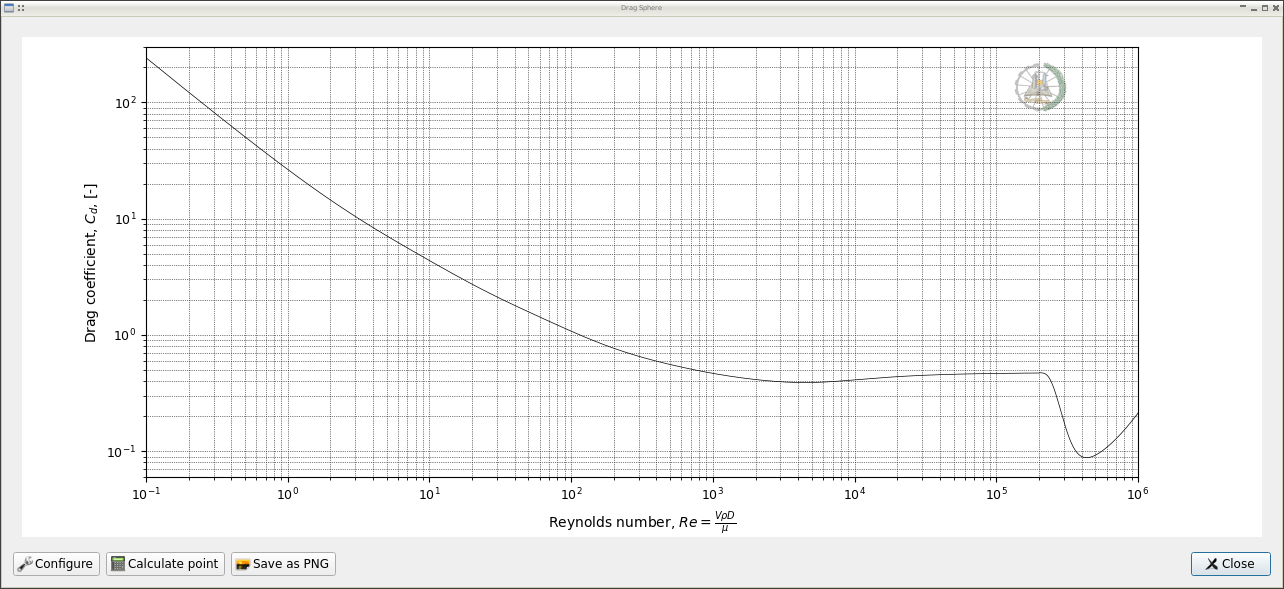
The diagram include all Reynolds number range, support for click interaction, let user save the chart as image and a dialog to calculate a individual point:
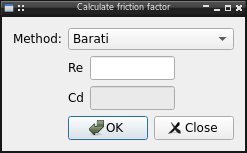
Configuration
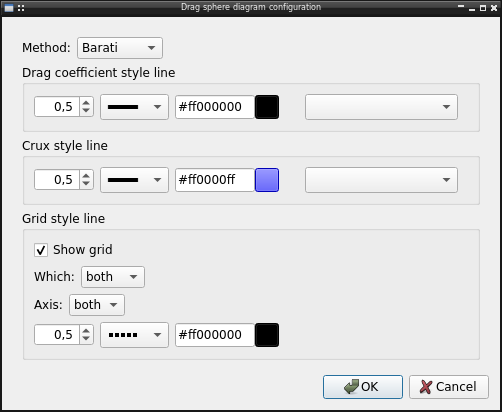
The diagram let user configure several options like:
Equation to use, by default the Barati correlation, but it’s possible use one of available in lib.drag
Line style used in plot
Line style used in crux when use mouse
Grid line visibility and style
Example
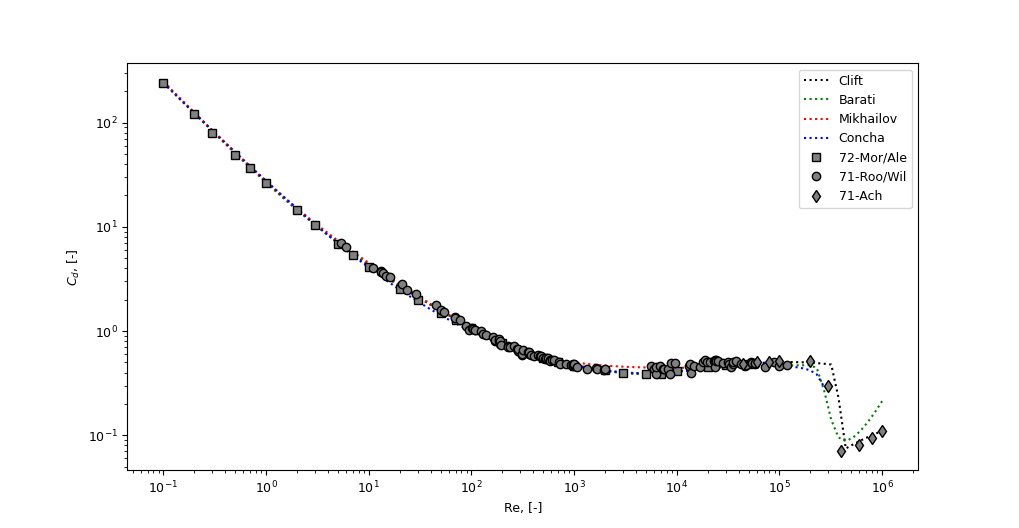
Comparing some correlations with experimental data
from matplotlib import pyplot
from numpy import logspace

from lib.drag import Clift, Mikhailov, Concha, Barati

corr = {
    Clift: {"c": "black", "ls": ":"},
    Barati: {"c": "green", "ls": ":"},
    Mikhailov: {"c": "red", "ls": ":"},
    Concha: {"c": "blue", "ls": ":"}}

Re = logspace(-1, 6, 100)
for f, kw in corr.items():
    Cd = []
    for re in Re:
        try:
            v = f(re)
        except NotImplementedError:
            v = None
        Cd.append(v)
    pyplot.plot(Re, Cd, label=f.__name__, **kw)


# Experimental date
# Morsi, S.A., Alexander, A.J.
# An Investigation of Particle Trajectories in Two-Phase Flow Systems
# J. Fluid Mechanics 55(2) (1972) 193-208
# doi: 10.1017/S0022112072001806
Re = [0.1, 0.2, 0.3, 0.5, 0.7, 1, 2, 3, 5, 7, 10, 20, 30, 50, 70, 100, 200,
      300, 500, 700, 1000, 2000, 3000, 5000, 7000, 10000, 20000, 30000,
      50000]
Cd = [240, 120, 80, 49, 36.5, 26.5, 14.4, 10.4, 6.9, 5.4, 4.1, 2.55, 2, 1.5,
      1.27, 1.07, 0.77, 0.65, 0.55, 0.5, 0.46, 0.42, 0.4, 0.385, 0.39, 0.41,
      0.452, 0.4697, 0.488]
pyplot.plot(Re, Cd, ls='', marker="s", mec="k", mfc="grey", label="72-Mor/Ale")


# Roos, F.W., Willmarth, W.W.
# Some Experimental Results on Sphere and Disk Drag
# Amer. Inst. Aeronautics and Astronautics 9(2) (1971) 285-291
# doi: 10.2514/3.6164
Re = [5.33, 5.99, 11.0, 13.1, 13.2, 13.9, 14.6, 16.2, 21.1, 23.4, 29.1, 45.0,
      50.6, 54.4, 68.9, 68.9, 78.2, 88.1, 93.8, 101, 104, 108, 109, 124, 130,
      138, 163, 168, 170, 186, 186, 189, 190, 191, 193, 229, 229, 240, 258,
      280, 284, 286, 311, 312, 318, 358, 361, 364, 379, 409, 444, 468, 472,
      480, 500, 522, 532, 532, 557, 579, 588, 603, 644, 713, 727, 833, 932,
      984, 985, 985, 1000, 1000, 1070, 1330, 1650, 1690, 1950, 2000, 5570,
      5990, 6210, 6250, 6900, 7280, 7520, 8230, 8580, 8700, 9620, 13300, 13400,
      13900, 14700, 16800, 18000, 18700, 19500, 21200, 23100, 23600, 23700,
      24100, 24200, 25000, 28000, 31900, 32400, 33800, 35400, 35500, 38200,
      41800, 45900, 46800, 52400, 53500, 57500, 57700, 71900, 89000, 100000,
      118300]
Cd = [7.06, 6.41, 4.01, 3.76, 3.66, 3.59, 3.41, 3.29, 2.82, 2.48, 2.28, 1.79,
      1.58, 1.52, 1.35, 1.33, 1.27, 1.12, 1.03, 1.08, 1.05, 1.02, 1.03, 0.994,
      0.927, 0.907, 0.879, 0.799, 0.819, 0.799, 0.841, 0.778, 0.751, 0.799,
      0.732, 0.711, 0.710, 0.700, 0.721, 0.674, 0.646, 0.675, 0.592, 0.607,
      0.656, 0.627, 0.600, 0.632, 0.595, 0.579, 0.585, 0.578, 0.566, 0.572,
      0.547, 0.544, 0.543, 0.556, 0.552, 0.523, 0.520, 0.531, 0.525, 0.505,
      0.480, 0.485, 0.472, 0.466, 0.477, 0.485, 0.472, 0.483, 0.452, 0.436,
      0.440, 0.435, 0.427, 0.430, 0.460, 0.430, 0.390, 0.451, 0.460, 0.430,
      0.435, 0.429, 0.390, 0.490, 0.490, 0.460, 0.480, 0.400, 0.460, 0.452,
      0.510, 0.523, 0.500, 0.509, 0.511, 0.529, 0.455, 0.524, 0.520, 0.519,
      0.495, 0.500, 0.479, 0.457, 0.482, 0.504, 0.513, 0.485, 0.467, 0.468,
      0.503, 0.497, 0.480, 0.492, 0.451, 0.502, 0.467, 0.476]
pyplot.plot(Re, Cd, ls='', marker="o", mec="k", mfc="grey", label="71-Roo/Wil")


# Achenbach, E.
# Experiments on the Flow Past Spheres at Very High Reynolds Numbers
# J. Fluid Mech. 54(3) (1972) 565-575
# doi: 10.1017/S0022112072000874
# Selected point of figure 4, the paper don't report the experimental data
Re = [4.4e4, 6e4, 8e4, 1e5, 2e5, 3e5, 4e5, 6e5, 8e5, 1e6]
Cd = [0.48, 0.5, 0.51, 0.52, 0.52, 0.3, 0.07, 0.08, 0.095, 0.11]
pyplot.plot(Re, Cd, ls='', marker="d", mec="k", mfc="grey", label="71-Ach")


pyplot.ylabel("$C_d$, [-]")
pyplot.xlabel("Re, [-]")
pyplot.xscale("log")
pyplot.yscale("log")
pyplot.legend()
pyplot.show()
API Reference
- The module include all related moody chart functionality
Drag: Chart dialogCalculateDialog: Dialog to calculate a specified point and its configurationConfig: Drag sphere chart configuration
- class plots.drag.Config(config=None, parent=None)[source]
Bases:
QWidgetDrag sphere chart configuration
Methods
value(config)Update ConfigParser instance with the config
- TITLE = 'Drag Sphere chart'
- TITLECONFIG = 'Drag sphere diagram configuration'
- class plots.drag.Drag(parent=None)[source]
Bases:
ChartDrag sphere chart dialog
- Attributes:
- note
Methods
Define the functionality when click the calculate point button
Remove crux and note if exist
click(event)Update input and graph annotate when mouse click over chart
config()Initialization action in plot don't neccesary to update in plot
createCrux(Re, Cd)Create a crux in selected point of plot and show data at bottom right corner
plot()Plot the drag chart using the indicate method
- title = 'Drag Sphere'
- locLogo = (0.8, 0.85, 0.1, 0.1)
- note = None
