tools.qtelemental module
This tool show a Mendeleev periodic table with several properties shown for the element with the mouse over.
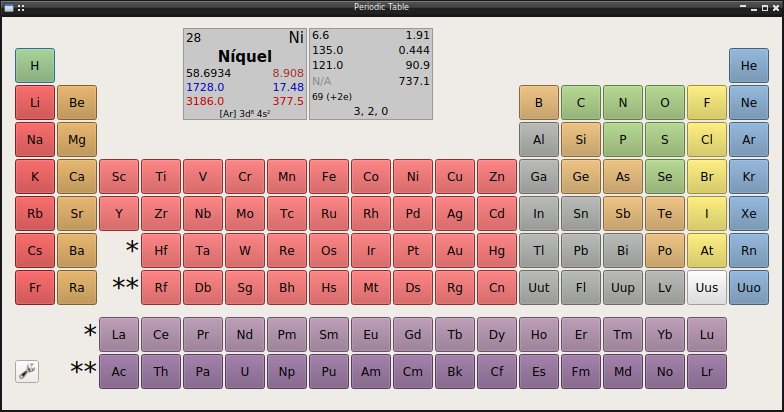
Other properties can be shown clicking in the desired element. The properties availables are:
Atomic number
Name
Alternate name
Symbol
Serie
Group
Period
Block
Solid density
Liquid density
Gas density
Appearance
Date of discovery
Country of discovery
Discovery author
Etymology
Atomic mass
Atomic volume
Atomic radius
Covalent radius
van der Waals radius
Ionic radii
Lattice type
Space group
Lattice edges
Lattice angles
Electron configuration
Oxidation states
Electronegativity
Electron affinity
First ionization
Melting temperature
Boiling temperature
Melting heat
Vaporization heat
Specific Heat
Thermal conductivity
Debye temperature
Color
Notes
Furthermore the element name and several properties has internationalization support with several languages availables: English, Spanish, German, French, Portuguese, Italian, Chinese
Configuration
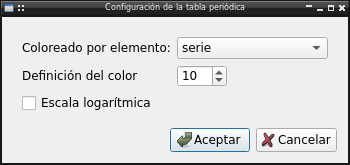
It’s possible change the appareance of element button choosing the property
API reference
- The module include all related functionality
qtelemental: Periodic table dialogboton: Element button in periodic tableElementDialog: Dialog to show properties of components
- and its configuration
Config: Configuration widgetConfigDialog: Dialog tool for standalone use
- class tools.qtelemental.qtelemental(parent=None)[source]
Bases:
QDialogPeriodic table graph
Methods
actualizar(elemento)Update botton info with data for current element
Show and update configuration of qtelemental
populate()Populate buttons in table
textData(widget, data[, color, color_dis])Set text and format for property in button
- class tools.qtelemental.boton(element, CATEGORIES, PROP, COLORS, PMAX, parent=None)[source]
Bases:
QPushButtonButton widget to define a element
Methods
enterEvent(event)Enter event to change boton info with new element data
press()Press button show elementDialog with other element data
- class tools.qtelemental.ElementDialog(elemento, parent=None)[source]
Bases:
QDialogDialog to show all element properties
Methods
drawData(unit, data[, unidad, txt])Return a widget with the data inprint unit: unidad subclass data: value to set unidad: unit of value to show txt: opcional txt to show for unit
