tools.costIndex module
Pychemqt include a basic cost stimation utility for equipments. The cost are updated using the Chemical Engineering Plant Cost Index (CEPCI) update monthly at https://www.chemengonline.com. The index define several kind of equipments with different update values.
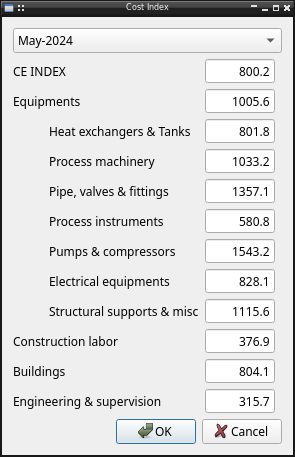
The module include all related cost index functionality:
UI_CostIndex: Dialog to show/configure costindex valuesCostData: Common widget for equipment with cost support
API reference
- class tools.costIndex.Ui_CostIndex(parent=None)[source]
Bases:
QDialogDialog to show/configure costIndex
Methods
accept()Overwrite accept signal to save changes
closeEvent(event)Override close event to ask data changes
loadData(i)Load costIndex data from file
Set custom currentIndex
- class tools.costIndex.CostData(equipment, parent=None)[source]
Bases:
QWidgetCommon widget for equipment with cost support It have property to easy access to properties:
factor: install factor
base: base index (January 1982)
actual: current index
values: a tuple with all properties, (factor, base,actual)
- Attributes:
Methods
enterEvent([event])Show costIndex button when mouse enter in widget
leaveEvent([event])Hide costIndex button when mouse leave widget
Show costIndes dialog to show/change
setActual(value)Set actual index value
setBase(value)Set base index value
setFactor(value)Set instalation factor value property
setValues(factor, base, actual)Set values property
valueChanged
- valueChanged
pyqtSignal(*types, name: str = …, revision: int = …, arguments: Sequence = …) -> PYQT_SIGNAL
types is normally a sequence of individual types. Each type is either a type object or a string that is the name of a C++ type. Alternatively each type could itself be a sequence of types each describing a different overloaded signal. name is the optional C++ name of the signal. If it is not specified then the name of the class attribute that is bound to the signal is used. revision is the optional revision of the signal that is exported to QML. If it is not specified then 0 is used. arguments is the optional sequence of the names of the signal’s arguments.
- __init__(equipment, parent=None)[source]
equipment: equipment class where the widget have to be put, define indiceCostos as a index in costIndex
- property factor
Instalation factor value property
- property base
Base index value
- property actual
Actual index value
- property values
Tuple with the instalation factor, the base and actual index
